Price and output at a glance
| Quality | Length | Price |
|---|---|---|
| 480p | 15 seconds | $5.99 |
| 720p | 15 seconds | $8.99 |
No subscription, credits or account registration. Choose 9:16 portrait or 16:9 landscape. The final total is shown in checkout.
TWO PHOTOS. A LITTLE FOOTWORK.
Create a 15-second Tiptoeing In My Jordans video from your two photos. One dancer, one seated observer and a playful, reference-guided scene. Choose your quality, pay once, and let the scene unfold.
Create a 15-second Tiptoeing In My Jordans video from two adult portraits. Pay once. No account needed.
Fixed duration for both 480p and 720p. Choose your quality below.
Photo 1: dancer. Photo 2: seated observer. Roles follow upload order, not gender. Use clear photos with one person in each. Each photo is sent for AI safety screening as soon as you select it; replace any photo that fails before generating. The server checks both again before sending approved photos to the video provider. Use consenting adult portraits only; AI cannot verify age or consent with certainty.
$5.99 · One-time payment · No subscription
15-second silent MP4 · No song or soundtrack included · Download within 3 days.
Selecting a photo sends a resized copy to our AI safety service. Optimized photos are temporarily stored privately for checkout and paid retries, then sent to the video provider only after payment verification and another safety check. When your video is ready, you can return to this browser to play or download it for up to three days after generation. Privacy · Terms · Prohibited content
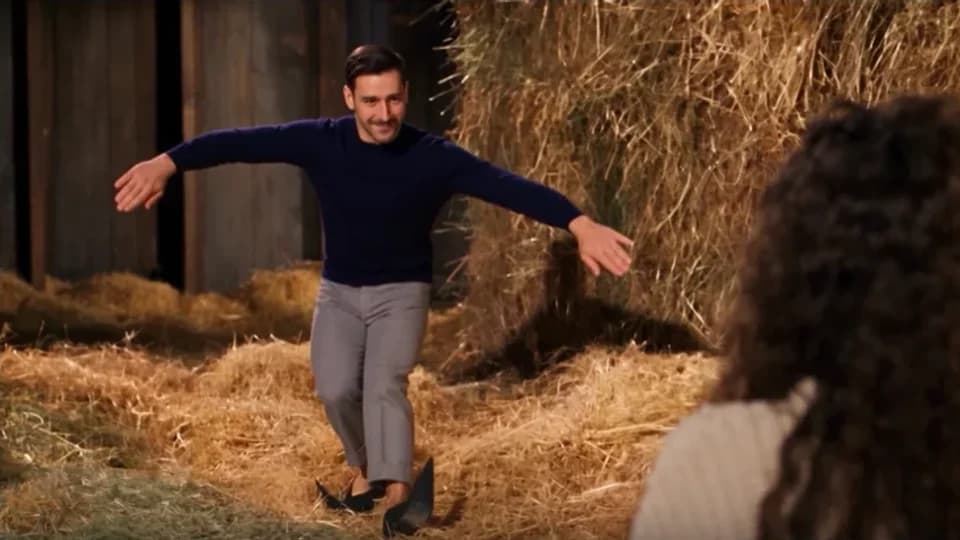
Real output created with this template from two photos. Silent video; no song included. Faces, details and motion can vary between generations.
Your finished videos will appear here.
Photos are screened before generation. No subscription. No account required.
WHAT YOU ARE BUYING
The Tiptoeing In My Jordans AI video generator on Zombie Video Lab turns two adult portraits into a new dance scene: photo 1 is the dancer and photo 2 is the seated observer. Our prepared storyboard and motion reference guide generation, so you do not need to write a prompt. Zombie Video Lab offers dance and zombie-themed templates; this page makes a dance video, not a zombie transformation.
| Quality | Length | Price |
|---|---|---|
| 480p | 15 seconds | $5.99 |
| 720p | 15 seconds | $8.99 |
No subscription, credits or account registration. Choose 9:16 portrait or 16:9 landscape. The final total is shown in checkout.
Published October 23, 2026: the site owner’s real generated example is shared with permission. Your private orders are not automatically made public. A downloaded device copy is not subject to the three-day delivery window.
FROM PORTRAITS TO A PLAYFUL SCENE
The Tiptoeing In My Jordans AI video generator keeps the setup simple. You choose the characters; the template supplies the scene.
Start your Tiptoeing In My Jordans video with the dancer first, then the person reacting. Choose clear, separate portraits of adults who have agreed to appear. We screen each photo as you select it.
Choose 480p or 720p for your Tiptoeing In My Jordans video, then vertical or landscape. Review the live price, keep your video code and complete secure checkout. A payment return alone never authorizes generation; the server verifies it.
After payment is verified, your Tiptoeing In My Jordans video starts generating. The progress bar is an estimate; rendering can take several minutes. Keep your video code. Refreshing this browser will recover the order without another purchase.
Find your finished Tiptoeing In My Jordans video under Your videos. Tap its thumbnail to play it in the large player, check the quality, duration and format, then download. Save within three days; use Watch sample video to return to the preview.
FROM UPLOADED PHOTOS TO MOVING CHARACTERS
These screenshots show one Tiptoeing In My Jordans result made with two portraits. Follow the upload order, choose your settings and let the prepared scene bring the two characters together. They illustrate a previous result, not a promise of identical output.
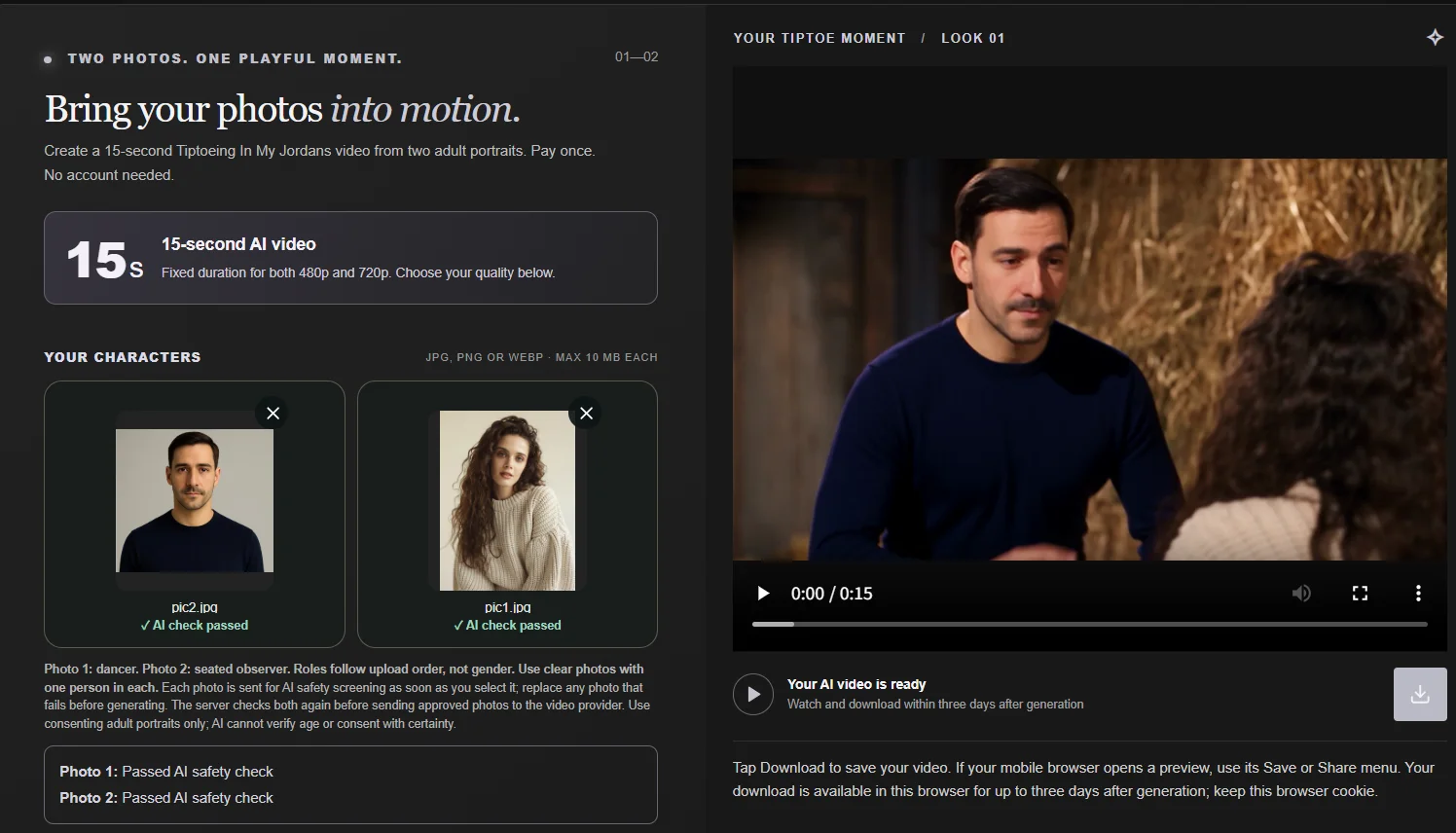
The first image sets the dancer; the second sets the seated observer. In this Tiptoeing In My Jordans example, the portraits and the finished interaction appear side by side. The template asks the model to retain each person’s identity and outfit; faces, clothing and expressions can still vary.
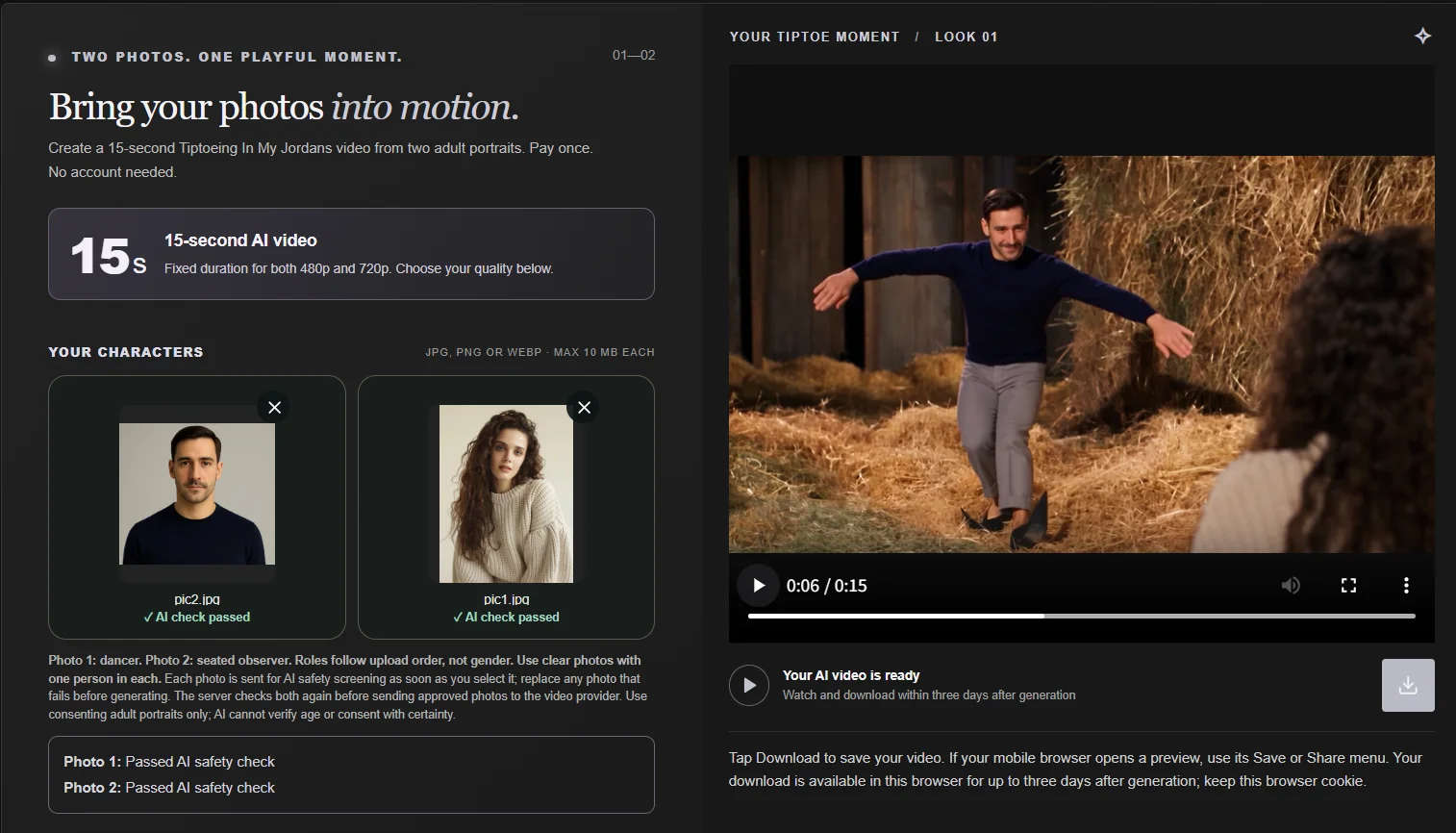
Later in this Tiptoeing In My Jordans result, the dancer moves into a full-body tiptoe while the other character watches. The 15-second template requests expressive gestures, footwork and a reaction shot. Your Tiptoeing In My Jordans video uses the selected 480p or 720p quality and portrait or landscape format, with no licensed soundtrack included.
BUILT AROUND YOUR TWO PHOTOS
A focused workflow for one playful clip, without a general-purpose editing dashboard.
Tiptoeing In My Jordans uses separate dancer and observer photos. The prompt keeps those roles fixed and asks for consistent faces and outfits throughout the scene, rather than choosing roles by gender.
The Tiptoeing In My Jordans template combines an ordered storyboard and a motion reference: a shushing gesture, expressive reactions, full-body tiptoeing and a footwork close-up. No prompt-writing experience is needed; AI results can vary.
Make Tiptoeing In My Jordans in a mobile-friendly tool without registering an account. Pick 480p or 720p, confirm the displayed price, then save your finished MP4 within three days. There are no subscription plans.
THE IDEA BEHIND THE TEMPLATE
Turn a pair of portraits into a lighthearted scene: the first character begins a tiptoe shuffle, the seated second character reacts with surprise, with a dedicated shoe close-up showing the footwork. The Tiptoeing In My Jordans template combines your two identity photos with a motion reference for a warm, rustic barn scene. Photo 1 always dances; photo 2 remains the seated observer.
Use Tiptoeing In My Jordans for a playful couple interaction, a friendly reaction clip or a short visual for your own social post. The result is AI-generated entertainment; facial details and movement can vary.
FIT THE WAY YOU SHARE
A vertical Tiptoeing In My Jordans video for phone-first viewing. The prompt asks for the performer's head and feet to stay visible during the footwork.
A landscape Tiptoeing In My Jordans video gives both characters room side by side. Your chosen ratio is sent to the video provider, not just applied to the player.
480p and 720p · 15-second target · MP4 download. This is a trend-inspired visual template, not an exact choreography or original-song reproduction. No licensed soundtrack is included.
CHOOSE THE RIGHT WORKFLOW
Use the Tiptoeing In My Jordans generator for a newly imagined scene with your two photo characters. Use a video editor when exact timing, licensed music or frame-by-frame control matters more.
Two portrait uploads, a prepared storyboard and reference-guided movement. One paid generation, no prompt writing or timeline editing. The model creates new footage, so motion, facial details and shot order may vary. A specific viral clip or exact likeness is not guaranteed.
Better if you already have footage and need to place cuts precisely, choose a platform-approved music track, or synchronize movement to a particular beat. You supply the footage and editing work, and must hold the necessary rights. Our generator does not provide these editing controls or the original song.
BEFORE YOUR FIRST MOVE
Practical answers about the Tiptoeing In My Jordans generator, photo roles, payments and keeping your video.
Need help? Contact usTiptoeing In My Jordans refers here to the playful dance-video trend built around exaggerated tiptoe steps and a surprised onlooker. Our template turns that idea into a personalized AI scene, using your two consenting adult portraits rather than simply placing a filter over an existing clip.
The Tiptoeing In My Jordans AI video generator on Zombie Video Lab creates a new 15-second dance interaction from two photos. You supply the people; our template supplies the scene instructions and motion reference. Choose a resolution and frame, purchase once, then play and download the finished clip.
Tiptoeing In My Jordans generation combines a prepared storyboard, a motion reference and two separate character roles. You do not need to write a detailed prompt, edit a timeline or buy a subscription. Upload-time safety checks, browser-based order recovery and MP4 downloads keep the workflow straightforward.
The Tiptoeing In My Jordans storyboard asks for a warm barn setting, a playful shushing gesture, a mischievous expression and bent-knee tiptoe footwork. It includes a footwork close-up and a seated observer reacting with surprise. These are generation instructions, not a guarantee that every shot will match exactly.
No. Audio generation is disabled for this template. The result is a silent MP4: it does not include the original song, generated background music or licensed lyrics. The reference guides visual movement and timing, not music rights. If you add audio in another editor, use a track you have permission to publish on your chosen platform.
Yes. The default preview marked REAL AI RESULT is an actual video created with this template, published with the site owner’s permission on October 23, 2026. It is a 15-second, 480p, 16:9 silent result, not the source motion reference. It shows one outcome, not a promise that every order will look identical. Your own videos are not automatically published as examples.
Zombie Video Lab offers photo-to-video entertainment templates, including zombie love stories and this Tiptoeing In My Jordans dance scene. This page is the dance template; it does not turn your people into zombies. The homepage offers the separate zombie couple template.
No. Tiptoeing In My Jordans is an independent, trend-inspired template on Zombie Video Lab. We are not affiliated with Nike, Jordan or the original performers. The service does not provide branded assets, music licenses or permission to impersonate somebody. Upload only authorized photos of consenting adults.
To make a Tiptoeing In My Jordans video, upload the dancer first and the seated observer second. Wait for both AI photo checks, choose 480p or 720p and an aspect ratio, confirm photo permissions, then review checkout. After verified payment, the server submits your 15-second generation request.
For Tiptoeing In My Jordans, photo 1 supplies the dancer and photo 2 supplies the seated observer. Roles follow upload order, not gender. Put the person you want performing the footwork in the first slot. Each photo should contain one adult with a clear, unobstructed face.
Yes. Tiptoeing In My Jordans does not restrict the dancer or observer role by gender. Swap your photos before checkout to reverse the roles. Once an order is created, its photos and format are saved together; use a new video code if you need a different setup.
A new Tiptoeing In My Jordans order requests 15 seconds, whether you choose 480p or 720p. This is the output length, not the time needed to generate it. The selected duration is sent to the video API along with your resolution and frame; encoding can introduce a small timing difference.
Use well-lit JPG, PNG or WebP photos with one consenting adult per image. Keep faces clear and clothing visible. Avoid group shots, collages, heavy filters and obstructed faces. Each upload can be up to 10 MB; the browser optimizes photos before submission.
The generation instructions ask the model to preserve each uploaded person's own face, hair, clothing and accessories without swapping identities. Clear reference photos help. AI can still change details, footwear or anatomy, so this is not a promise of an exact likeness or frame-perfect choreography.
Yes. Tiptoeing In My Jordans offers 480p and 720p for the same 15-second storyboard. Resolution controls the requested output quality, not the number of characters or story length. Choose the option you want before checkout; the generator sends that resolution to the API instead of merely changing the player label.
Tiptoeing In My Jordans supports 9:16 portrait and 16:9 landscape. Portrait suits phone-first viewing; landscape leaves more horizontal room for the dancer and observer. Your selection is included in both the API parameters and the prompt, with instructions to keep the footwork visible.
480p: $5.99 USD; 720p: $8.99 USD. Each purchase covers one 15-second video. There is no subscription or credit bundle. Review the final total in checkout before paying; an eligible retry uses the original paid order rather than a second purchase.
You can watch the published example for free. Creating your own video is a paid, one-time purchase; there is no free generation or subscription trial. The selected resolution price is shown before you enter checkout.
No prompt is required. Upload two permitted photos and choose resolution and aspect ratio; our prepared storyboard and movement reference are submitted for you. This is AI scene generation, not an editor that copies the original footage frame by frame.
Yes. Tiptoeing In My Jordans supports mobile photo selection, checkout, generation status and playback. No account registration is required. Stay in the same browser and keep its cookies. Your video code helps identify an order for support, but it is not a password for opening private videos on another device.
Video generation is not instant; processing depends on the provider's queue and selected settings. The page displays progress while a task is running. Its progress bar is an estimate, not a guaranteed countdown. Keep your code and check the same browser instead of paying again while waiting.
A confirmed Tiptoeing In My Jordans generation failure may be retried on the same paid order while its retry allowance and stored photos remain available. Open Payments & retries to check your options. If submission status is uncertain, do not buy again; contact support with the video code and consult our Refund & Delivery Policy.
Yes. A completed Tiptoeing In My Jordans video can be played and downloaded as an MP4. Use the download button below the player or beside its thumbnail. Some mobile browsers open a preview first; use their Save or Share control to keep a copy on your device.
Your completed video records can reappear after a refresh in the same browser, using its signed cookie and saved video references. Do not clear that browser's cookies or switch devices expecting automatic recovery. This saves access information; it does not permanently store the full MP4 in your browser cache.
Download your Tiptoeing In My Jordans MP4 within three days after generation completes. The private collection is a temporary delivery area, not a permanent video library. A copy downloaded to your own device remains yours to keep; the three-day limit applies to our private delivery area, not your local file. Keeping a video code alone does not extend retention or restore access after your browser credentials are removed.
If your video shows as completed but the player cannot load, try the download button and refresh the page in the same browser. Do not pay for a replacement just because playback failed. If both playback and download are unavailable, contact support with your video code.
Tiptoeing In My Jordans photos are screened by AI on upload and checked server-side before generation. Only authorized, consenting adult portraits are allowed; nudity, sexual content and graphic violence are prohibited. Approved photos are processed by external AI services. See our Privacy Policy for handling and retention; automated checks are not infallible.
You can download a Tiptoeing In My Jordans result for sharing when you have the necessary photo, likeness and other rights. Follow the destination platform's AI-content rules, and do not present a synthetic scene as a real event. We do not supply third-party music rights or guarantee platform approval.